


搜索到
105
篇与
的结果
-
 VLC media player 官网地址中文网页: https://www.videolan.org/vlc/下载地址国内镜像下载地址:https://mirrors.ustc.edu.cn/videolan-ftp/vlc/版本平台架构链接备注3.0.21windowsx86vlc-3.0.21-win32.exe 3.0.21windowsx86vlc-3.0.21-win32.zip 3.0.21windowsx86vlc-3.0.21-win32.7z 3.0.21windowsx64vlc-3.0.21-win64.exe 3.0.21windowsx64vlc-3.0.21-win64.zip 3.0.21windowsx64vlc-3.0.21-win64.7z 3.0.21macOSarm64vlc-3.0.21-arm64.dmg 3.0.21macOSx64vlc-3.0.21-intel64.dmg 3.0.21macOSx64/arm64vlc-3.0.21-universal.dmg 3.0.21源码windows/macOSx86/x64vlc-3.0.21.tar.xz 3.5.4androidarmv7VLC-Android-3.5.4-armeabi-v7a.apk 3.5.4androidarm64VLC-Android-3.5.4-arm64-v8a.apk 3.5.4androidx86VLC-Android-3.5.4-x86.apk 3.5.4androidx64VLC-Android-3.5.4-x86_64.apk 2024-09-25 18:09:16 星期三
 -
Thunderbird 官网地址中文网页: https://www.thunderbird.net/zh-CN/下载地址版本平台架构链接备注128.2.3windowsx64Thunderbird Setup 128.2.3esr.exe 128.2.3windowsx64Thunderbird Setup 128.2.3esr.msi 128.2.3windowsx86Thunderbird Setup 128.2.3esr.exe 128.2.3linuxx64thunderbird-128.2.3esr.tar.bz2 128.2.3linuxx86thunderbird-128.2.3esr.tar.bz2 128.2.3macOSx64Thunderbird 128.2.3esr.dmg 115.15.0windowsx64Thunderbird Setup 115.15.0.exewindows 7/8.1115.15.0windowsx86Thunderbird Setup 115.15.0.exewindows 7/8.12024-09-25 18:02:04 星期三
-
-
-
Registry Finder 官网地址英文网页: https://registry-finder.com/下载地址版本平台架构链接备注2.59windowsx86/x64RegistryFinderSetup2.59.exeSHA256 b6502ce87a3f3c35ee4ab8f5e360e6bab0db7e89336c0e69f2017f9f77984c7d2.59windowsx86RegistryFinder.zipSHA256 e358bfc47cf28fcabca9e52ac181e5b9ca8adcb44939f590122e6839bfcc24602.59windowsx64RegistryFinder64.zipsha256 0c43bb2deeab65ae24e3855a55861b2ebb02658425f3c5f3c66c9c9d47c89b302024-09-25 14:02:57 星期三
-
Vim 官网地址英文网页: https://www.vim.org/项目地址: https://github.com/vim/vim项目地址: https://github.com/vim/vim-win32-installer下载地址ftp站点:ftp://ftp.vim.org/pub/vim/pc版本平台架构链接备注9.1.0windowsx86gvim_9.1.0_x86_signed.exestable9.1.0windowsx64gvim_9.1.0_x64_signed.exestable9.1.0windowsx86gvim_9.1.0_x86_signed.zipstable9.1.0windowsx64gvim_9.1.0_x64_signed.zipstable9.1.0源码 vim-win32-installer-9.1.0.zipstable9.1.0源码 vim-win32-installer-9.1.0.tar.gzstable9.0.1413linuxx64GVim-v9.0.1413.glibc2.14-x86_64.AppImagelatest Ubuntu 18.04 based installation9.0.1413linuxx64Vim-v9.0.1413.glibc2.14-x86_64.AppImagelatest Ubuntu 18.04 based installation9.0.1413源码 vim-appimage-9.0.1413.ziplatest Ubuntu 18.04 based installation9.0.1413源码 vim-appimage-9.0.1413.tar.gzlatest Ubuntu 18.04 based installation2024-09-25 15:08:33 星期三
-
-
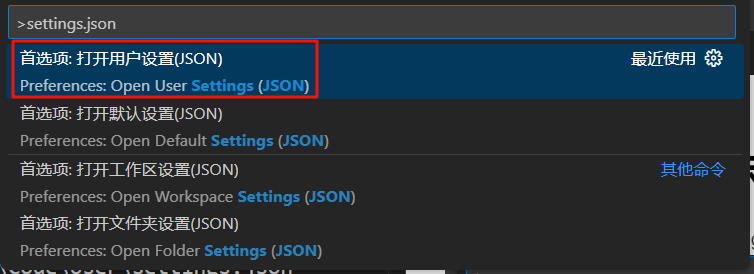
使用Visual Studio Code一些问题的解决方案 编辑页对当前行进行高亮显示ctrl+shift+p 呼出命令栏,输入 settings.json ,选择“首选项:打开用户设置[JSON]”实际打开文件类似如下路径C:\Users\player001\AppData\Roaming\Code\User\settings.json在其中添加以下内容 // 当前行高亮 "editor.renderLineHighlight": "line", // 控制编辑器是否仅在焦点在编辑器时突出显示当前行:否 "editor.renderLineHighlightOnlyWhenFocus": false, "workbench.colorCustomizations": { // 光标所在行高亮内容的背景颜色 "editor.lineHighlightBackground": "#d2d5d774", // 光标所在行四周边框的背景颜色 "editor.lineHighlightBorder": "#e60d0d" },实际效果如下使用免安装版给右键添加“用 Visual Studio Code 打开”菜单使用免安装版本的VS Code时,右键点击文件没有“用 Visual Studio Code 打开”的菜单,此时可以通过修改注册表手动添加。编辑一个注册表文件,随便起一个名字,如 open with VS Code.reg,添加以下内容注:此处的例子使用的路径是 D:\\nosetup-tools\\VSCode\\Code.exe 注意替换程序实际路径Windows Registry Editor Version 5.00 [HKEY_CLASSES_ROOT\*\shell\Visual Studio Code] "Icon"="D:\\nosetup-tools\\VSCode\\Code.exe" @="用 Visual Studio Code 打开" [HKEY_CLASSES_ROOT\*\shell\Visual Studio Code\Command] @="\"D:\\nosetup-tools\\VSCode\\Code.exe\" \"%L\"" [HKEY_CLASSES_ROOT\Directory\shell\Visual Studio Code] "Icon"="D:\\nosetup-tools\\VSCode\\Code.exe" @="用 Visual Studio Code 打开" [HKEY_CLASSES_ROOT\Directory\shell\Visual Studio Code\Command] @="\"D:\\nosetup-tools\\VSCode\\Code.exe\" \"%L\"" 保存后双击执行文件导入注册表即可。使用时出现花屏的解决方案正常使用的 VS Code 在最近几次更新后突然出现了bug,如下所示(放大看比较明显,不要以为是你屏幕上的灰,哈哈哈),有时甚至是比较大的白块,开始以为是电脑屏幕坏了,后来发现只有在使用 VS Code 的时候会出现这种情况,特别是在黑色背景和白色背景之间来回切换的时候,又时甚至打开软件就会立即出现这种白点。继续使用的过程中发现这种情况还会扩散到其他软件上,即其他软件有黑色背景的,也会一定概率出现白点,其实不限于黑色背景,只要不是白色的背景理论都会显现出白点,只是黑色或深色比较容易观察到。搜索一番后,没有查到明显相关的资料,但找到了其他人汇报的另一个问题,使用 VS Code 出现白屏,他找到的解决方案是启动 VS Code 时传入一个禁止GPU的属性--disable-gpu。我也尝试了一下,竟然意外的解决了问题。具体操作如下,在可启动 VS Code 的地方,如快捷方式或注册表添加的右键菜单,在启动命令里添加上述参数。修改后重新启动 VS Code 即可发现情况有所好转,基本解决问题。通过这个问题的现象来看 VS Code 估计对显示驱动有点挑剔,具体原因就不深究了,不是电脑屏幕坏了就行。注:通过配置VSCode运行时使用集显或许也能解决问题
-
WinRAR 官网地址英文网页(发布者网站): https://www.win-rar.com/start.html英文网页(开发者网站): https://www.rarlab.com/下载地址版本平台架构链接备注7.01windowsx64winrar-x64-701.exe 7.01windowsx64winrar-x64-701sc.exe简体中文商业版wrr7.01windowsx64winrar-x64-701sc.exe简体中文商业版rrlb7.01windowsx64winrar-x64-701sc.exe简体中文个人版7.01windowsx86winrar-x32-701.exe 7.01windowsx86winrar-x32-701sc.exe简体中文商业版wrr7.01windowsx86winrar-x32-701sc.exe简体中文商业版rrlb7.01windowsx86winrar-x32-701sc.exe简体中文个人版7.01linuxx64rarlinux-x64-701.tar.gz 7.01linuxx86rarlinux-x32-701.tar.gz 7.01bsdx64rarbsd-x64-701.tar.gz 7.01bsdx86rarbsd-x32-701.tar.gz 7.01androidarm64rar-android-701.123.apk 6.24windowsx64winrar-x64-624.exe 6.24windowsx64winrar-x64-624sc.exe简体中文商业版wrr6.24windowsx64winrar-x64-624sc.exe简体中文商业版rrlb6.24windowsx64winrar-x64-624sc.exe简体中文个人版6.24windowsx86winrar-x32-624.exe 6.24windowsx86winrar-x32-624sc.exe简体中文商业版wrr6.24windowsx86winrar-x32-624sc.exe简体中文商业版rrlb6.24windowsx86winrar-x32-624sc.exe简体中文个人版6.24linuxx64rarlinux-x64-624.tar.gz 6.24linuxx86rarlinux-x32-624.tar.gz 6.24bsdx64rarbsd-x64-624.tar.gz 6.24bsdx86rarbsd-x32-624.tar.gz 2024-09-25 17:49:57 星期三
-






![酷呆桌面[Coodesker]](https://all.17zturn.com/usr/themes/Joe/assets/thumb/34.jpg)